
Automation
SmarTT MCP
An MCP server that gives an AI agent direct access to your SmarTTest workspace: reading tests, writing automation, scoring its own work, and executing runs.
What it is for#
Writing browser automation is a loop: read the test, write a plan, run it, see what broke, fix it, run it again. Doing that through a chat window means a person copying context in one direction and code back in the other, which is slow and lossy.
The MCP server removes the copying. The agent reads the test from SmarTTest itself, writes the automation back into it, runs the Quality Engine on what it produced, and fixes what the scorecard flags, without you in the middle of each step.
The agent acts as you
The package#
Two ways to connect#
There is a hosted server you connect to over the network, and a local server you run on your own machine. They expose the same tools, with one difference that decides which you want.
| Parameter | Type | Description |
|---|---|---|
| Remote (HTTP + OAuth) | hosted | Nothing to install. You log in and approve access in the browser. Works with any client that supports remote MCP connectors. Cannot drive a browser itself; it queues execution on a runner instead. |
| Local (stdio) | npx | Runs on your machine, so it can drive a real browser directly. This is what you want while writing and debugging automation, because the develop-run-develop loop happens in place with no queue. |
Tip
Setting up the remote connector#
The remote server speaks Streamable HTTP and authenticates with OAuth 2.1, using dynamic client registration and PKCE, so there is no key to create, paste, or rotate.
- 1
Add the connector in your client
Point it at:In Claude, this is Settings → Connectors → Add custom connector.MCP server URLhttps://www.smarttest.cloud/api/mcp/http - 2
Approve access
Your browser opens on SmarTTest. Log in if you are not already, review what the connector is asking for, and approve. - 3
Done
The tools appear in your client. Access tokens are short-lived and refresh on their own.
Execution is not available remotely
execute_test and execute_run are not exposed over HTTP. Use run_on_runner, which queues the work on a machine that can run it. See SmarTT Runner CLI.Setting up the local server#
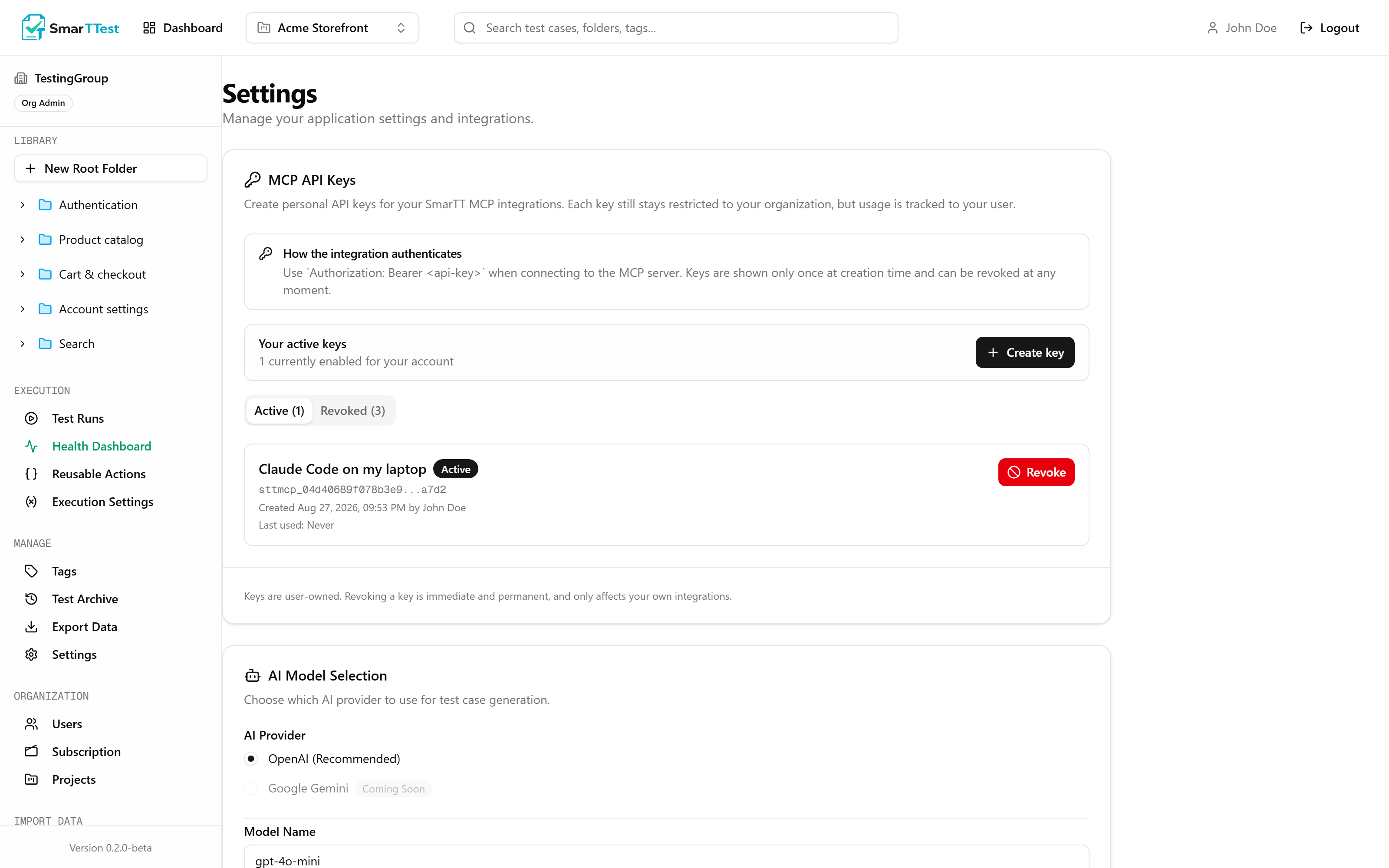
1. Create an API key
In SmarTTest, go to Settings → MCP API Keys and create one. It is shown once, and only a hash is stored, so it cannot be recovered later.
2. Add it to your client
Most clients use the same shape. For Claude Desktop or Claude Code:
{
  "mcpServers": {
    "smarttest": {
      "command": "npx",
      "args": ["-y", "@smarttest/mcp"],
      "env": {
        "SMARTT_MCP_API_KEY": "your-key-here"
      }
    }
  }
}
3. Restart the client
The tools appear once it reconnects.
Configuration
| Parameter | Type | Description |
|---|---|---|
| SMARTT_MCP_API_KEYreq | string | The key from Settings → MCP API Keys. |
| SMARTT_API_BASE_URL | urldefault https://www.smarttest.cloud | Only needed if you point at a different SmarTTest instance. |
| SMARTT_ARTIFACTS_DIR | path | Where local execution artifacts (screenshots, recordings) are written. |
Requirements for local execution#
Running tests locally needs a browser and a video encoder. The package installs Playwright as a dependency; the browser binaries themselves are a separate download:
npx playwright install chromium
npx playwright install ffmpeg
Missing ffmpeg fails in a confusing way
How to use it#
The agent works best when you let it close its own loop rather than approving each step. A productive session looks like:
Note
list_projects, locate elements by role and accessible name before anything else, never save a locator without resolving it first, put the login in a reusable action, and check the result with analyze_test_quality. That is the part people used to have to repeat in every prompt.- 1
Point it at a test
"Automate the checkout test in the Payments folder." It finds the project, the folder, and the test on its own. - 2
Let it iterate
With the local server it can execute without arunId, which leaves no trace in any run. That is the point: the develop-run-develop loop should not pollute your history. - 3
Make it check its own work
"Runanalyze_test_qualityand fix what it finds." The scorecard is deterministic, so this is a real check rather than the agent grading itself. - 4
Then execute for real
Pass arunIdwhen you want the result recorded, or queue the whole run withrun_on_runner.
Trying a command before writing it#
An agent writing automation is guessing at locators. It reads the page, decides that a button is called "Free", and writes a step. If four elements answer to that name the test fails later, during a run, for a reason that reads like a product bug. Two tools exist so that guess can be checked at the moment it is made, when correcting it is cheap.
When the agent can see the page
validate_automation takes a list of commands and the HTML of the page, and reports what each locator actually matches: nothing, one element, or several. When it finds several it returns samples of each, which is usually enough to see what makes them different.
This is the one to reach for whenever the agent has the page in front of it, which covers a browser extension, a tab it is driving, or a local Playwright setup. Reading the markup tells it what an element looks like. What reading cannot tell it is how many other elements answer to the same accessible name, because that is a question about the whole document rather than the element in hand, and it is the usual reason automation fails later.
Because it resolves against markup rather than navigating anywhere, a page behind a login is no harder than a public one: capture the rendered DOM from the browser you are already signed into and pass that. Nothing has to be reachable from our side.
It works on both transports, but resolving needs a browser. The local server uses the one on your machine and answers immediately; the hosted connector forwards the markup to a runner, which takes a few seconds. What neither can tell you is whether an element is visible: the markup arrives without its stylesheets.
When the agent cannot see anything
The limit of the above is that someone has to supply the markup. An agent with no browser of its own has nothing to capture, and a screen that only appears after a click is not in any snapshot. For that there are live sessions: open_browser_session opens a browser on a runner and, if you give it a testCaseId, runs that test up to whichever step you name before handing it over. The reusable preconditions always run, so upToStep: 0 means signed in and nowhere else yet.
From there send_browser_command sends one command at a time and get_browser_command reports what it did. A command that fails leaves the page exactly where it was, so the next attempt starts from the same place rather than from a fresh login. When the agent is done, close_browser_session ends the browser and gives the runner back.
Note
The tools#
Forty tools on either connection, forty-five across both, grouped by what they touch. Each one is documented with its parameters and what it is for in the tool reference.
- Projects, folders and tags: finding your way around.
- Tests: reading, creating, updating, archiving, and quality analysis.
- Reusable actions: the shared blocks and how tests attach to them.
- Environments and variables: what execution needs, without exposing secrets.
- Runs: creating them, recording results, closing them.
- Execution: locally, or queued onto a runner.
If something is not working#
- No tools appear: the client did not connect. Restart it, and check the key is in
envand not inargs. - Everything returns unauthorized: the key was revoked, or belongs to a different instance than
SMARTT_API_BASE_URLpoints at. - Execution tools are missing: you are on the remote connector. They only exist locally; use
run_on_runner. - Runs fail in seconds with a path error: ffmpeg is not installed. See above.